
Professional Layout Tool

AB LayoutTool

Accurate wall measurement and data collection
directly from your project plans

WEB-BASED
No Download Required
Launch directly in your browser

Streamline your workflow by tracing retaining walls directly from PDFs and images, then seamlessly export data to AB Walls or the Allan Block Estimating Tool.

PDF Import
Scale Setting
Point Tracing
Data Export
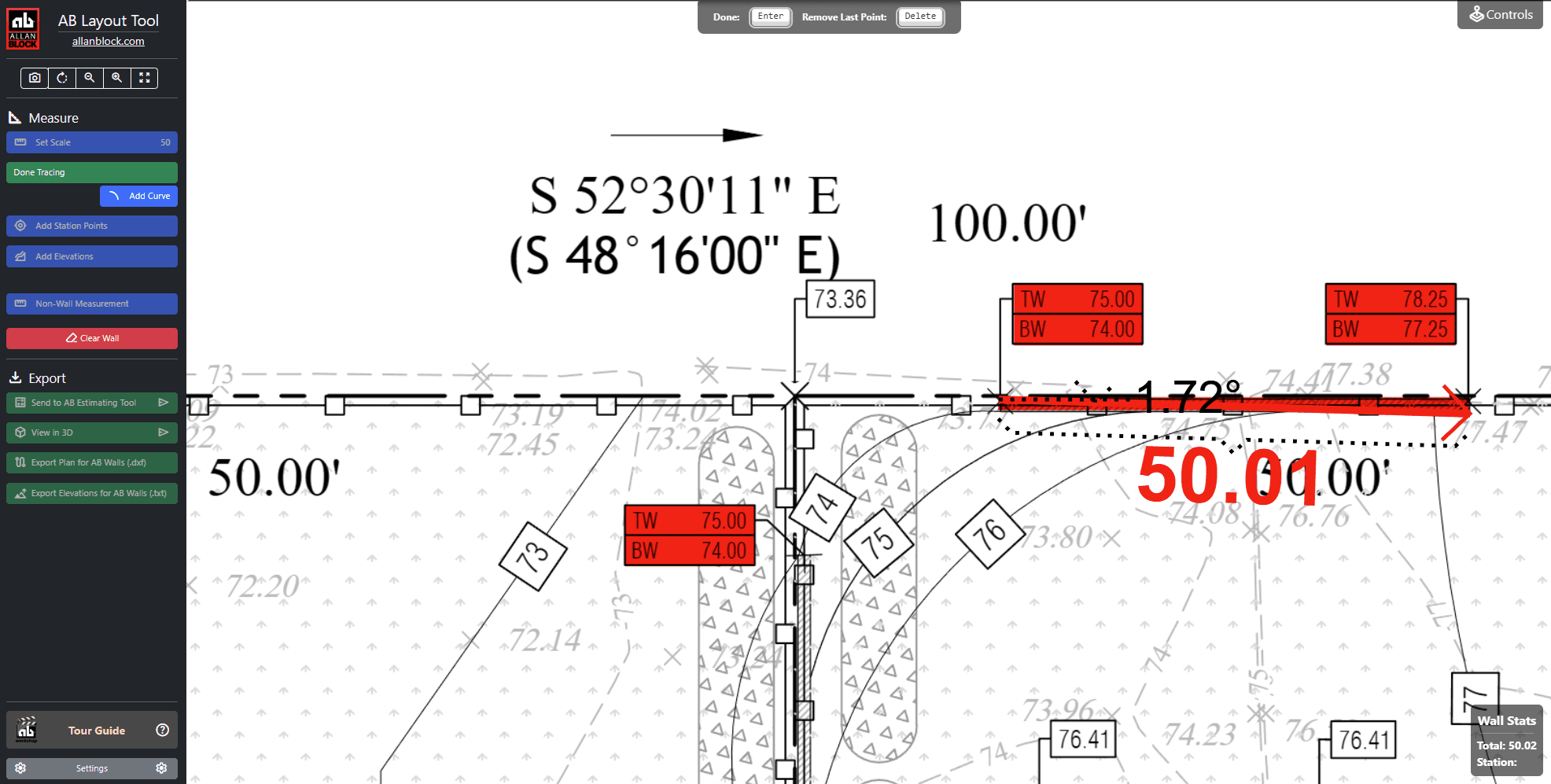
AB Layout Tool Interface
Interactive Plan Tracing
Precision measurement from project drawings
V1.0
Sept 2024
Web
Based
Integrated
Workflow

Streamline Your Data Collection

Replace manual measurements with precise digital tracing. The AB Layout Tool eliminates rulers and notepads, providing direct integration with Allan Block's design and estimating tools.
Core Capabilities

Visual Interactive Interface
Collect retaining wall geometry and engineering data points from PDFs or images
Seamless Integration
Direct data export to AB Walls Design Software and Allan Block Estimating Tool
3D Visualization
Generate 3D visual outputs for better project understanding
Designed Projects Focus
Optimized for extracting data from professionally designed project plans

Why Use This Tool?

Efficiency

Eliminates manual measurement with rulers and notepads. Direct input to design tools streamlines the entire workflow.

Accuracy

Precise data collection from working drawings ensures accurate representation for engineering or estimation.

Reliability

Essential for capturing project details quickly and accurately, making design and estimation more reliable.

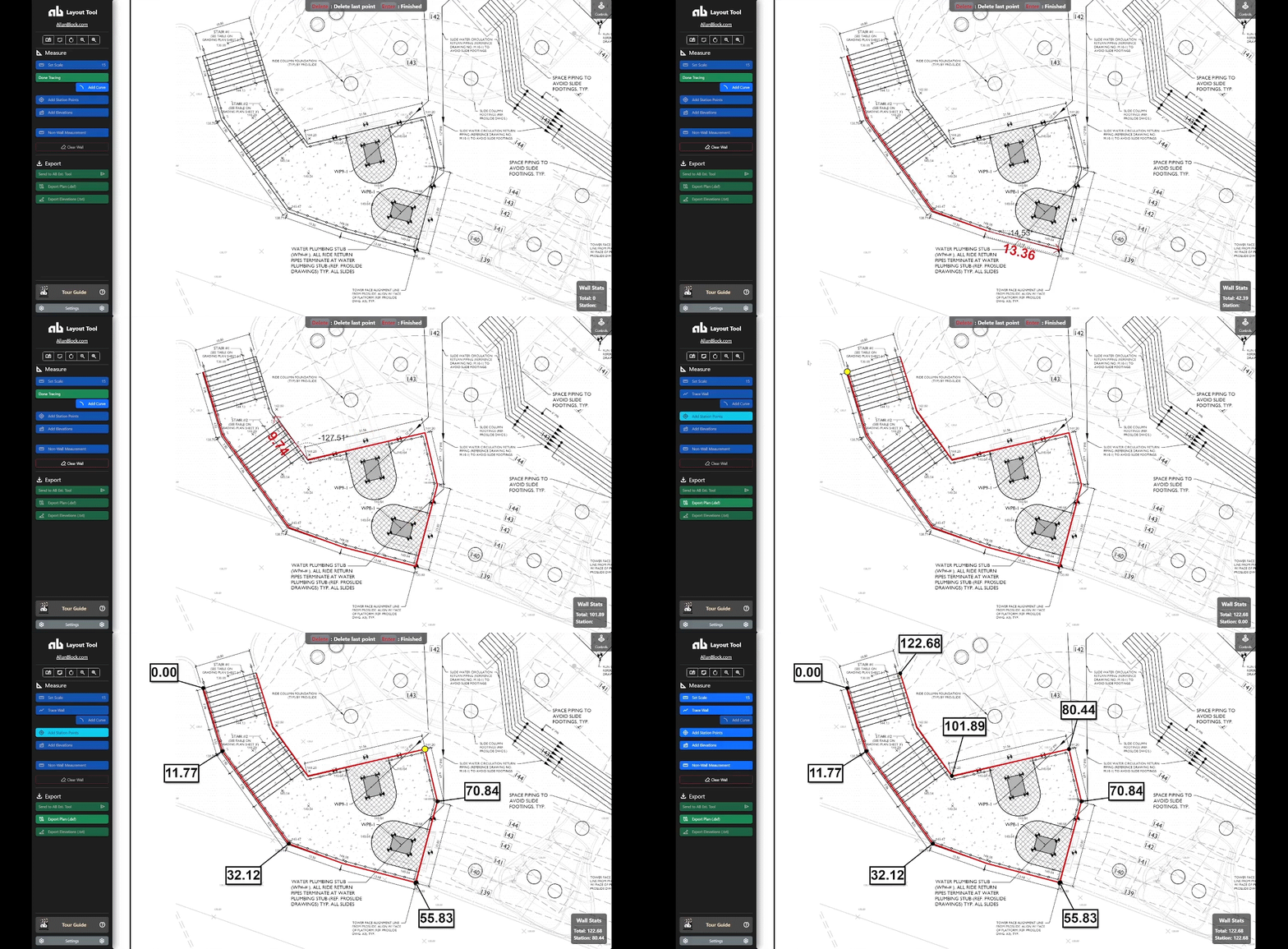
Simple 6-Step Process

From plan upload to data export - the entire process takes just minutes

1

Launch Tool

Click the link to open - no program download required

2

Load Plan

Import a PDF or image file to trace

3

Set Scale

Configure the scale provided from your plans

4

Trace Wall

Click points along the wall to create accurate traces

5

Add Details

Input stationing points and elevation data

6

Export Data

Send data directly to AB Walls or Estimating Tool

Seamless Tool Integration

The AB Layout Tool is designed to work perfectly with Allan Block's professional design and estimating software

AB Walls Design Software

Export layout data directly into AB Walls for comprehensive retaining wall design, 3D modeling, and professional construction drawings.

Learn About AB Walls

Allan Block Estimating Tool

Send precise measurements to the estimating tool for accurate material calculations, labor estimates, and project costing.

Learn About Estimating

System Requirements

Compatible Devices

  • • Desktop computers
  • • Laptop computers
  • • Modern web browsers (Chrome, Firefox, Safari, Edge)

Not Compatible

  • • Mobile phones
  • • Tablets
  • • Touch-screen only devices

The AB Layout Tool requires a computer with mouse/trackpad for precise point clicking and plan tracing functionality.

Training & Support

Get expert training and support to maximize your productivity with the AB Layout Tool

Available Training Options

One-on-one training sessions
Group training for teams
Integration with other AB tools
Best practices and workflow optimization

Contact Allan Block Engineering

Our engineering department provides comprehensive training and ongoing support for all Allan Block tools and software.

Email: engineering@allanblock.com

Training available for individuals and teams

Ready to Streamline Your Workflow?

Start using the AB Layout Tool today and experience the efficiency of digital plan tracing with seamless integration to Allan Block's professional design tools.

Version 1.0 • September 2024 • Computer only